Real project
AutoGestor — The freelancer's digital studio
Client and finance management for Brazilian sole proprietors (MEIs) who sell services: it works out what to charge, publishes a storefront that captures requests, warns when a quote eats into the margin and shows the money that actually came in.

- from sign-up to a published storefront, price already worked out
- 5 min
- spent on AI for pricing and alerts: it's all formulas in code
- R$ 0
- architecture decisions recorded as ADRs
- 14
- automated tests across rules, API and interface
- 1.100+
- Year
- 2026
- Role
- Product, design & full-stack
- Client
- Produto próprio
- Stack
- Next.js
- React
- TypeScript
- Fastify
- PostgreSQL
- Drizzle ORM
- Better Auth
- Zod
- Tailwind CSS
- Cloudflare
- Sentry
- Docker
Brazil has over 16 million sole proprietors (MEIs). Many are great at their craft and bad at charging for it: they copy competitors' prices, forget the hours spent answering clients and writing quotes, and by month-end don't know whether they made a profit. Management is scattered across notebooks, spreadsheets and chats buried in WhatsApp.
AutoGestor starts from a simple thesis: managing should be a consequence of selling, not an extra chore. So the product is organized around the client flow — from the storefront that captures the request to the quote, the approval and the payment — rather than being a mini-ERP full of forms.
I built the whole product: strategy, product design, architecture and code, in a monorepo with 14 decisions recorded as ADRs. Below is a real journey of a new professional, with screenshots of the running system and fictitious data — from the first click on the landing page to the first money in the till.
1. What's your hour worth?
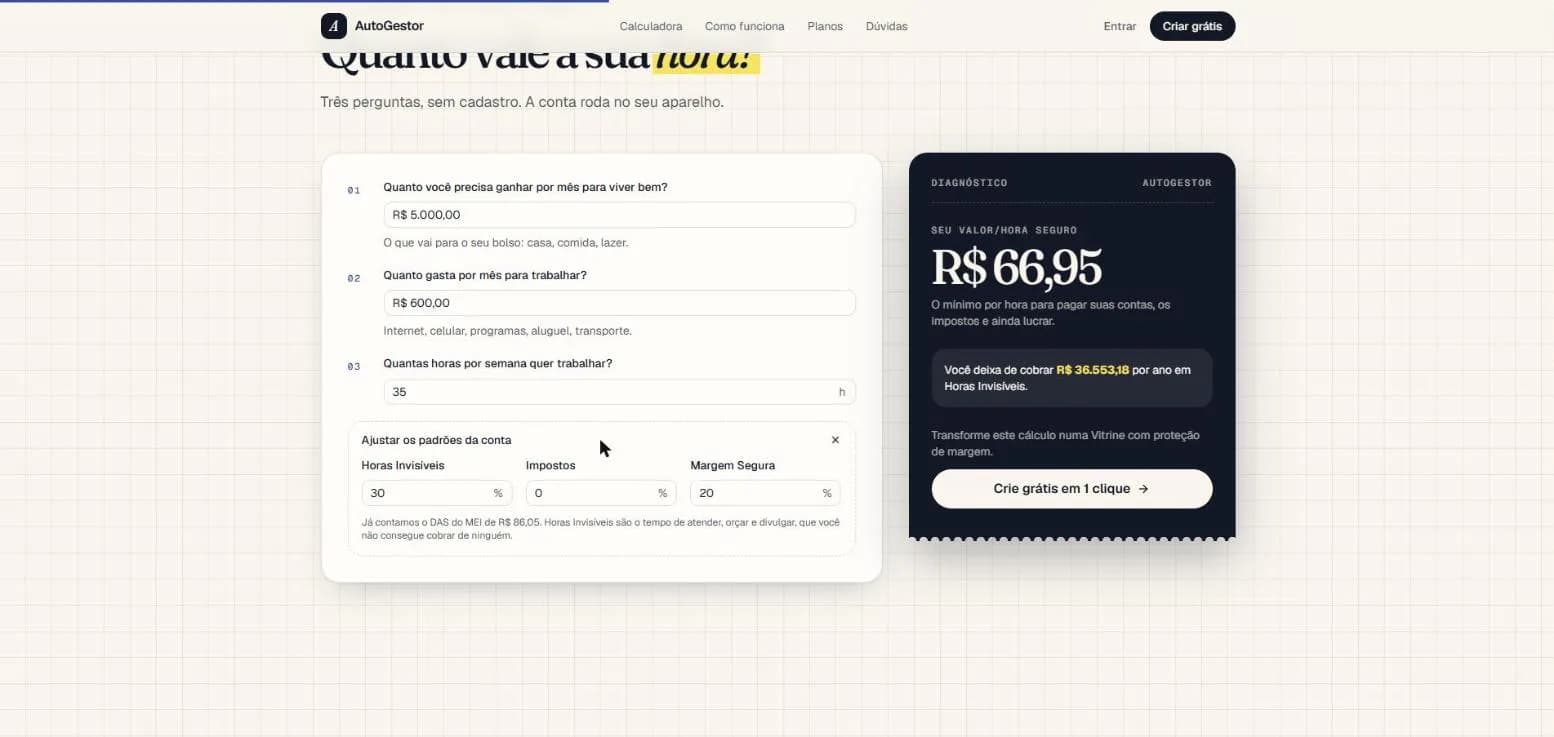
The entry point isn't a sign-up form: it's an open calculator on the landing page. Three questions — how much you need to live on, how much you spend to work and how many hours you want to work — and the visitor learns their Safe Hourly Rate and how much they fail to charge each year in invisible hours. It's the tool doubling as marketing: the product introduces itself by solving a problem before asking for anything.
The maths looks simple but carries decisions. It adds the MEI monthly tax (DAS) to costs, discounts the hours nobody pays for (answering, quoting, promoting) and reserves a profit margin. For a designer who needs R$ 5,000 to live, spends R$ 600 to work and wants 35 hours a week, the safe rate comes out at R$ 66.95 — and invisible hours add up to R$ 36.5k a year she isn't charging.
All of it is deterministic calculation, in code. No AI doing arithmetic: zero cost per use and the same result every time. Values are handled in cents and rounding happens only once, at the end, so errors don't pile up.
export function valorHoraSeguroExato(entrada: EntradaValorHora): Resultado<number> {
  const horas = horasFaturaveis(entrada); // horas do mês × (1 − horas invisíveis)
  if (!horas.ok) return horas;
  if (entrada.margemSegura + entrada.aliquotaImpostos >= 1) {
    return falha("MARGEM_MAIS_IMPOSTO_ACIMA_DE_100");
  }
  const fatorLiquido = 1 - entrada.margemSegura - entrada.aliquotaImpostos;
  return { ok: true, valor: entrada.custoFixo / (horas.valor * fatorLiquido) };
}
2. From new account to live storefront
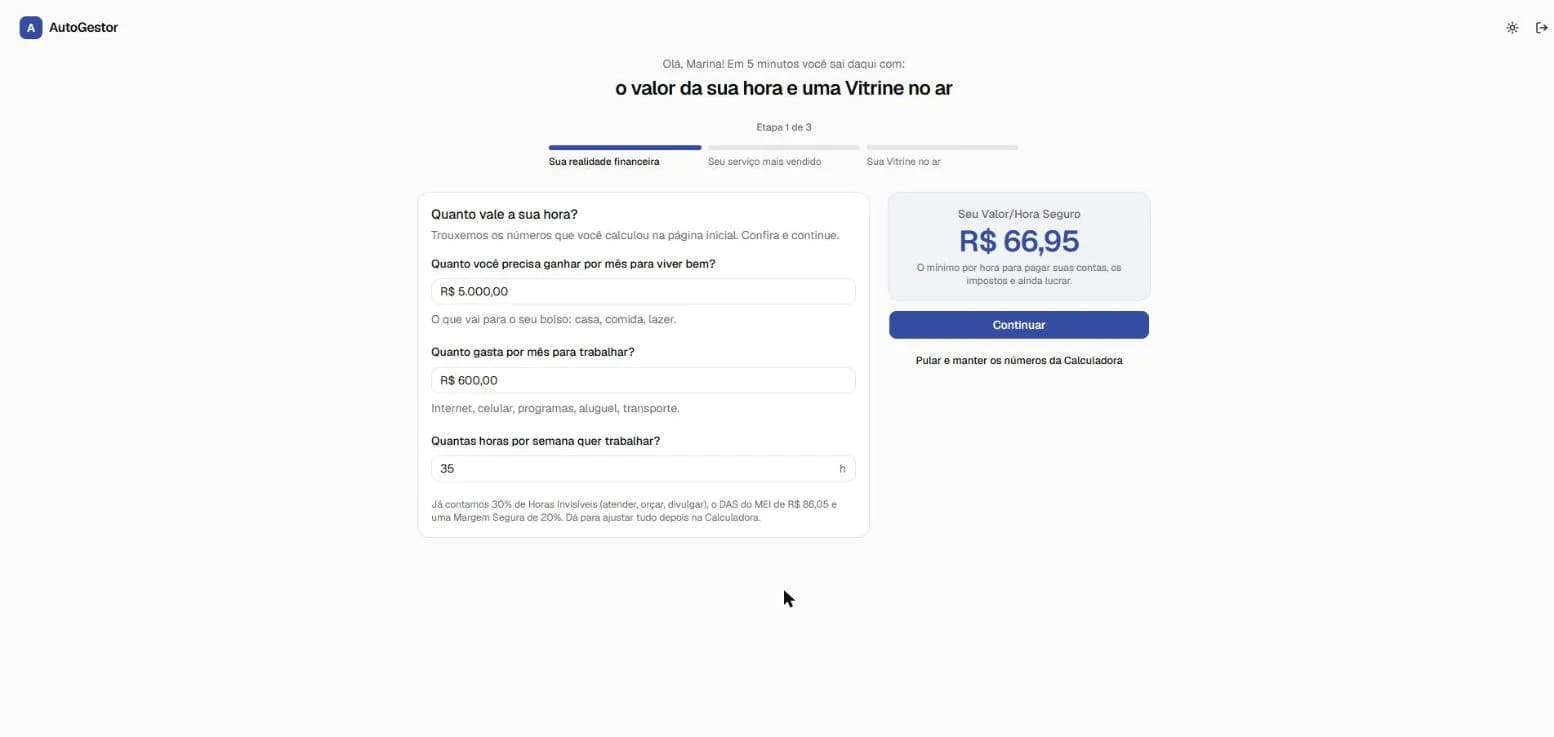
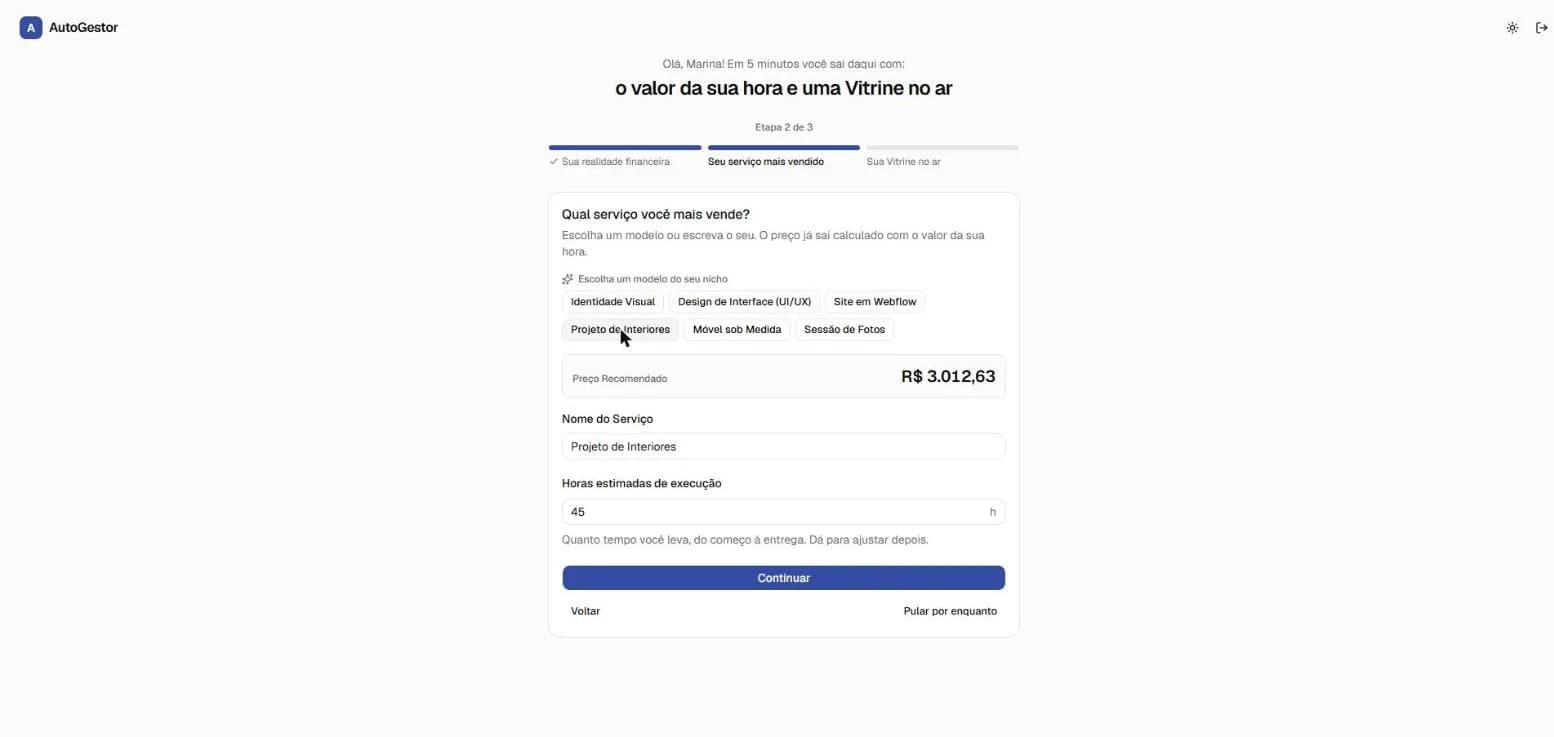
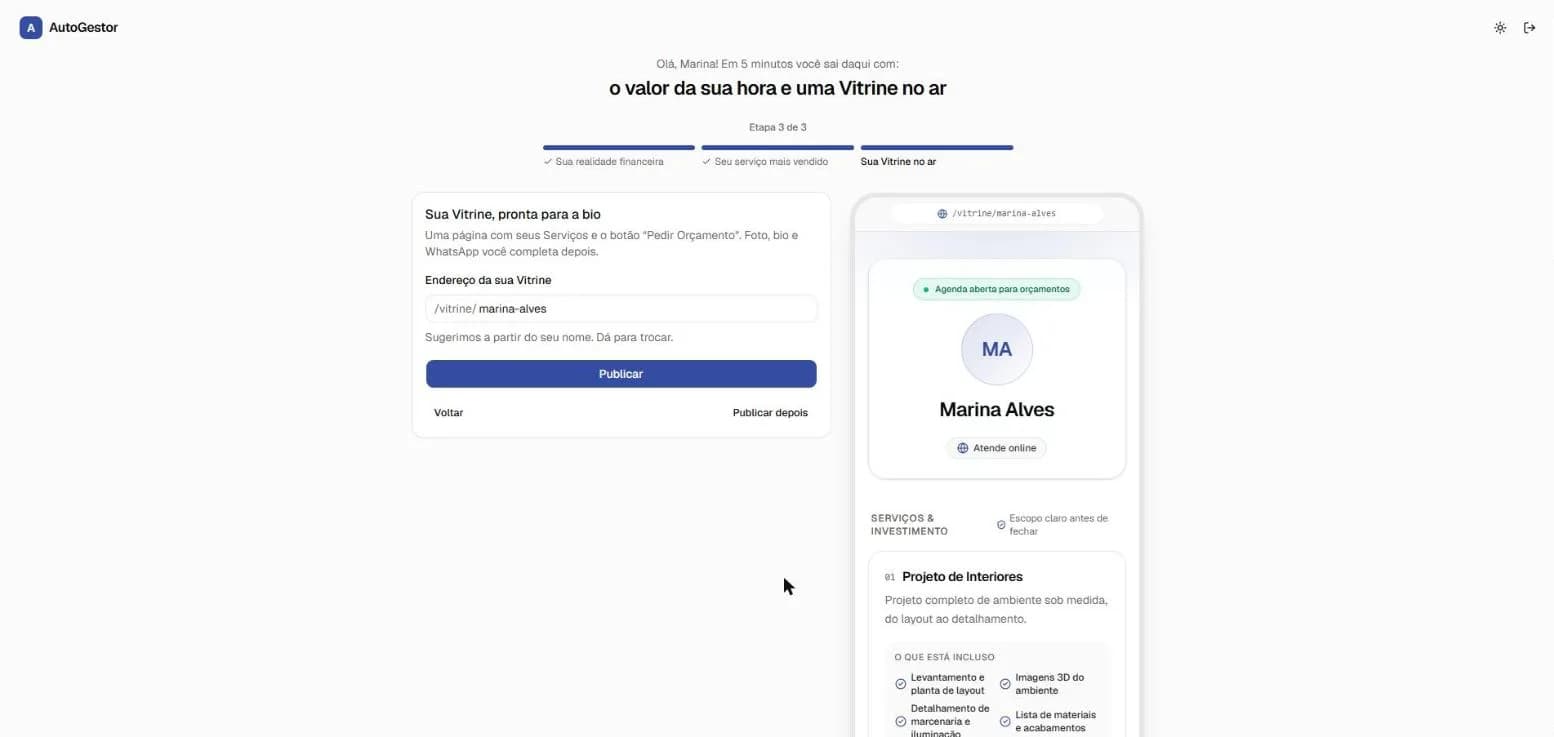
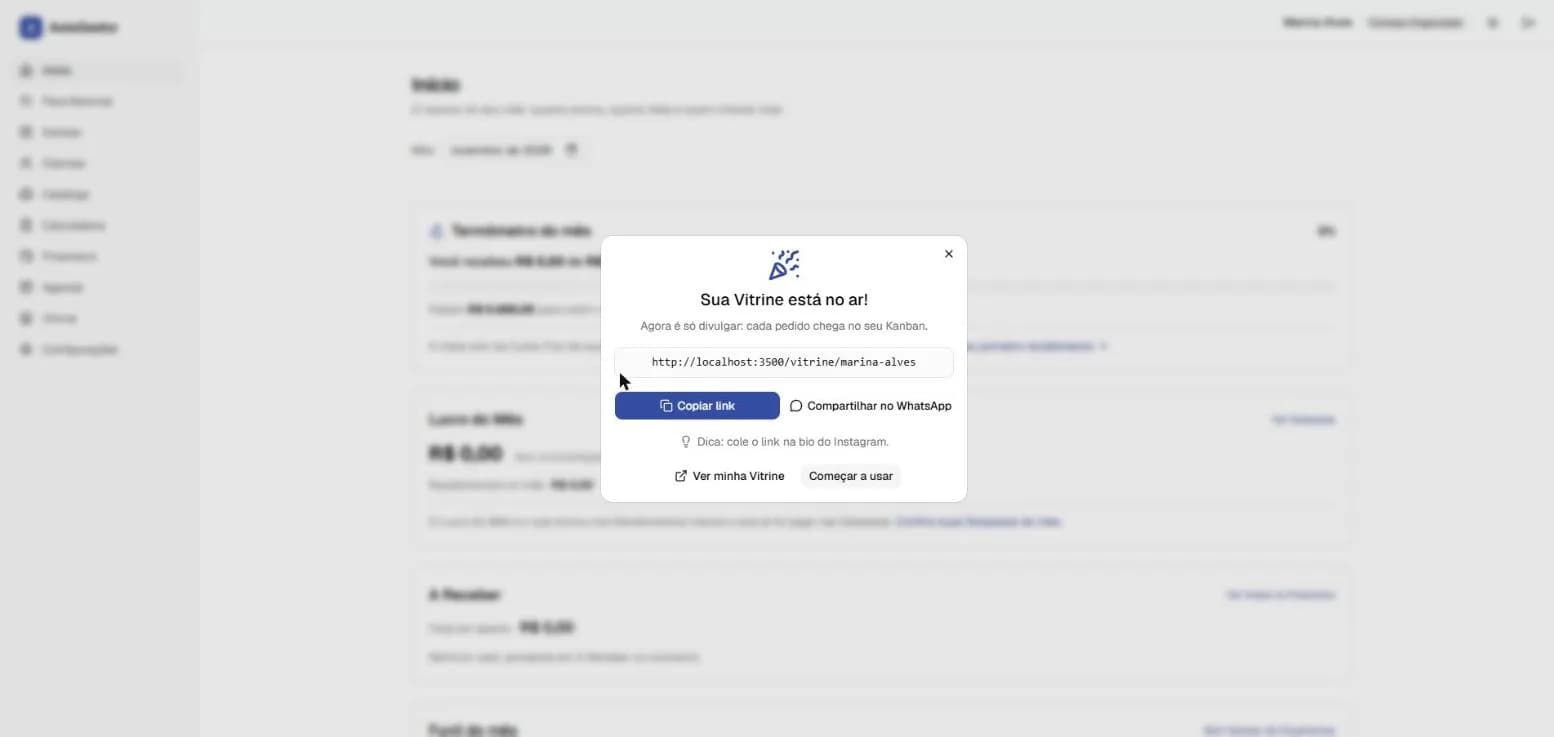
The biggest risk for a small-business SaaS is the first few minutes: users sign up, find empty screens asking for setup and leave. So sign-up leads straight into a three-step wizard designed to deliver value in under five minutes.
Step one arrives pre-filled with the calculator's numbers. In step two, the professional picks a template for her niche — here, Interior Design — and the price is computed from her hourly rate. In step three, the storefront shows up in a phone preview and goes live with one click, with a link ready to paste into her Instagram bio.
3. The storefront and the first request
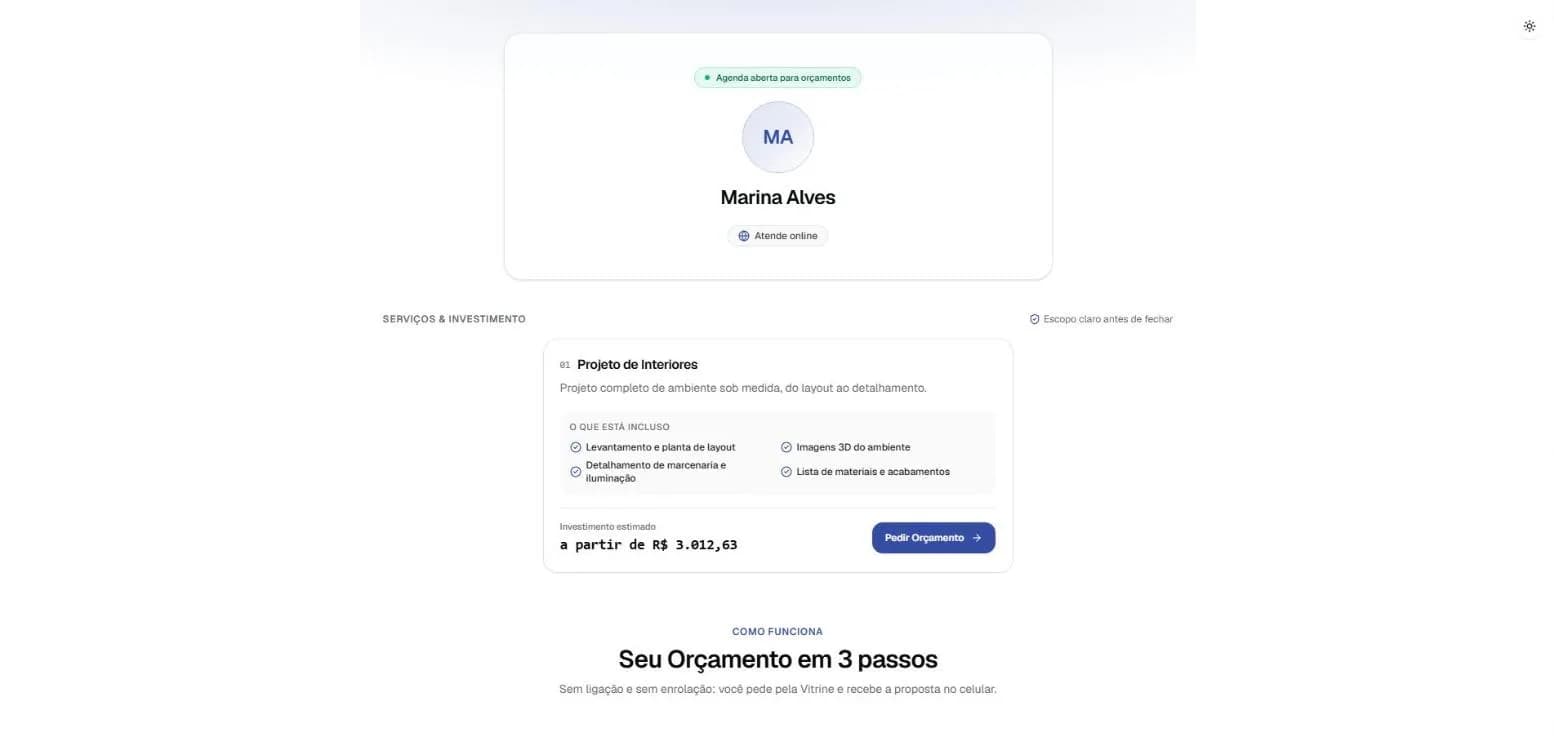
The storefront is the only part of the system open to the public, and the one that can get the most traffic: an Instagram post that goes viral brings thousands of visits for a user who might not even pay. So it's generated as a static page (Next.js ISR) and served from Cloudflare's cache. A visit never touches the database or uses server time; the cache is only refreshed when the professional changes the storefront or a price.
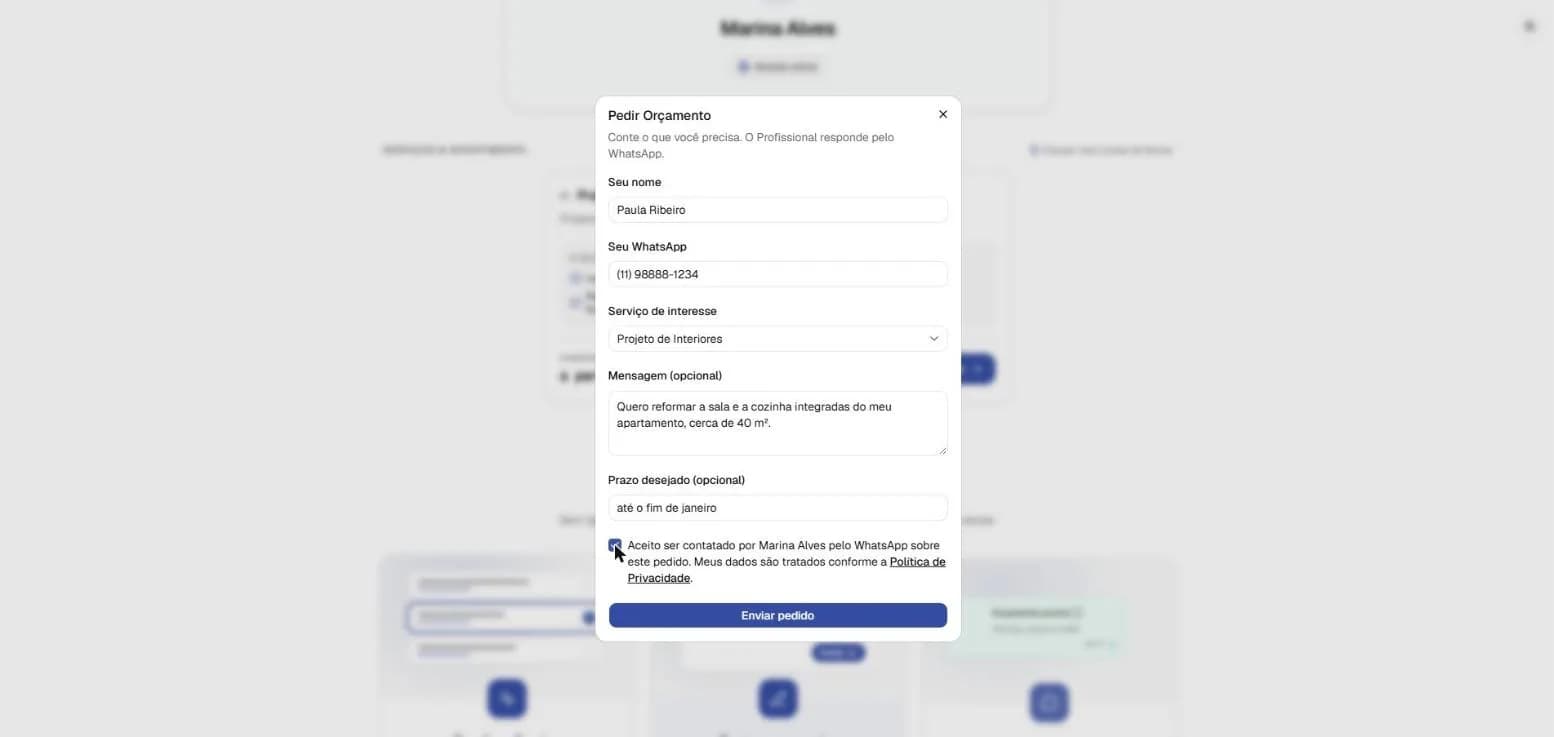
The client picks a service and asks for a quote in a short form. That's the most abuse-prone spot, so it has several layers: Cloudflare Turnstile, an invisible field only bots fill in, a limit of five requests per hour per IP and a size cap. In the database, the public role can't write to any table: it can only call one function, which validates everything and stores the client and the quote.
4. Kanban and the margin alert
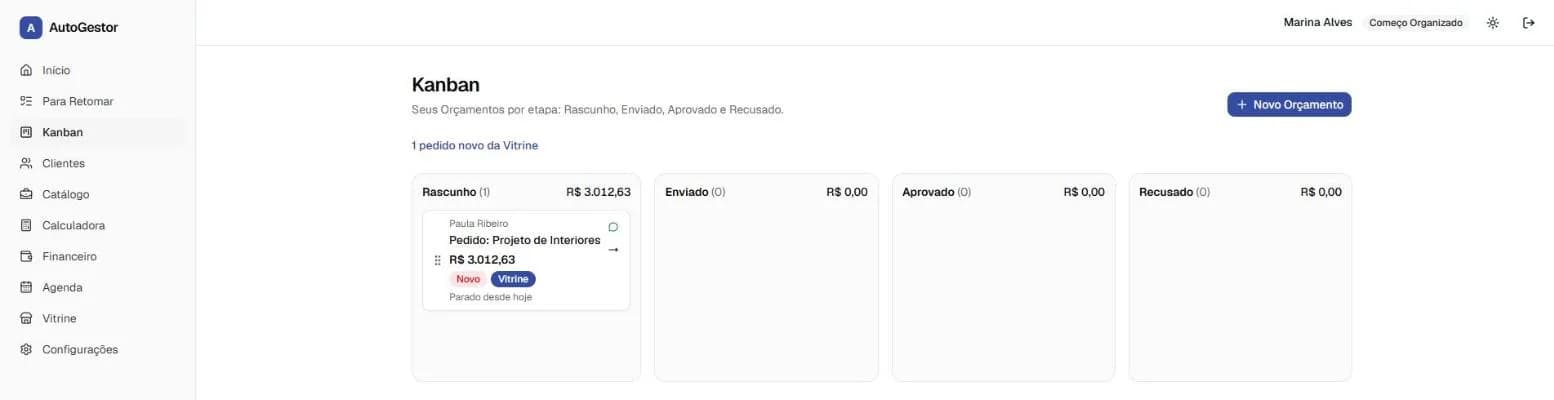
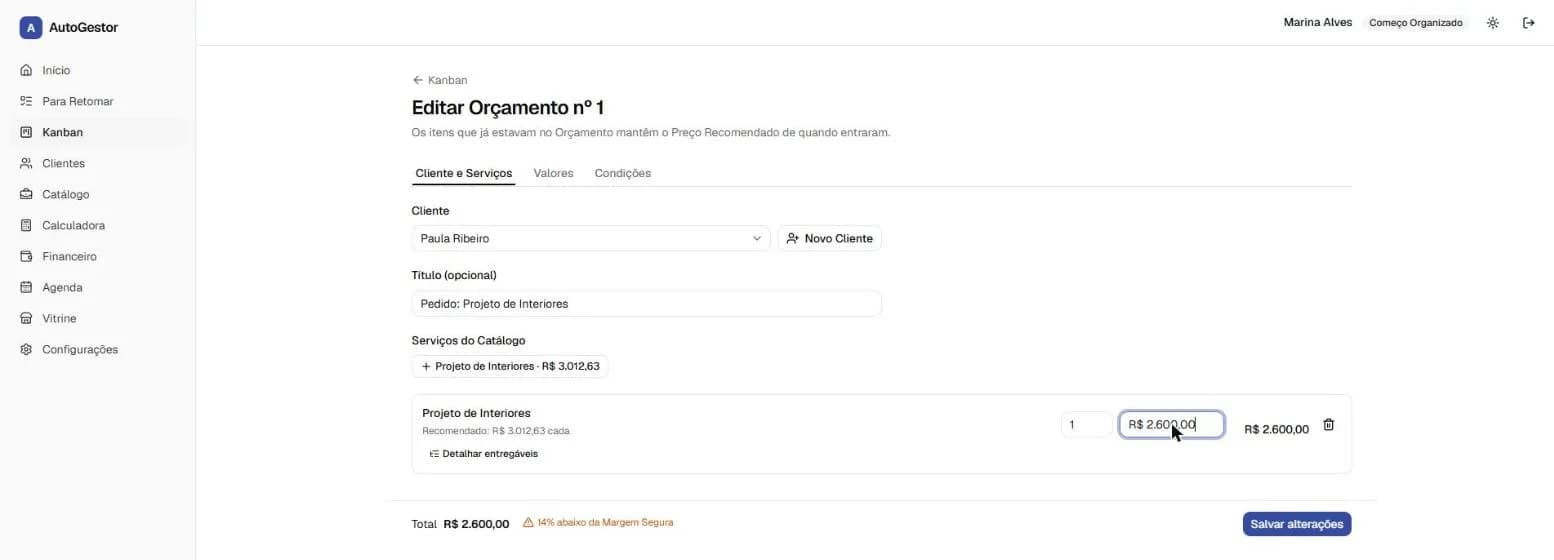
The request lands on the professional's Kanban board as a draft, tagged as coming from the storefront. She opens the quote, adjusts what she needs and negotiates. Here's the product's edge: the system stores the Recommended Price from when the service was added to the quote and compares it with the proposed amount.
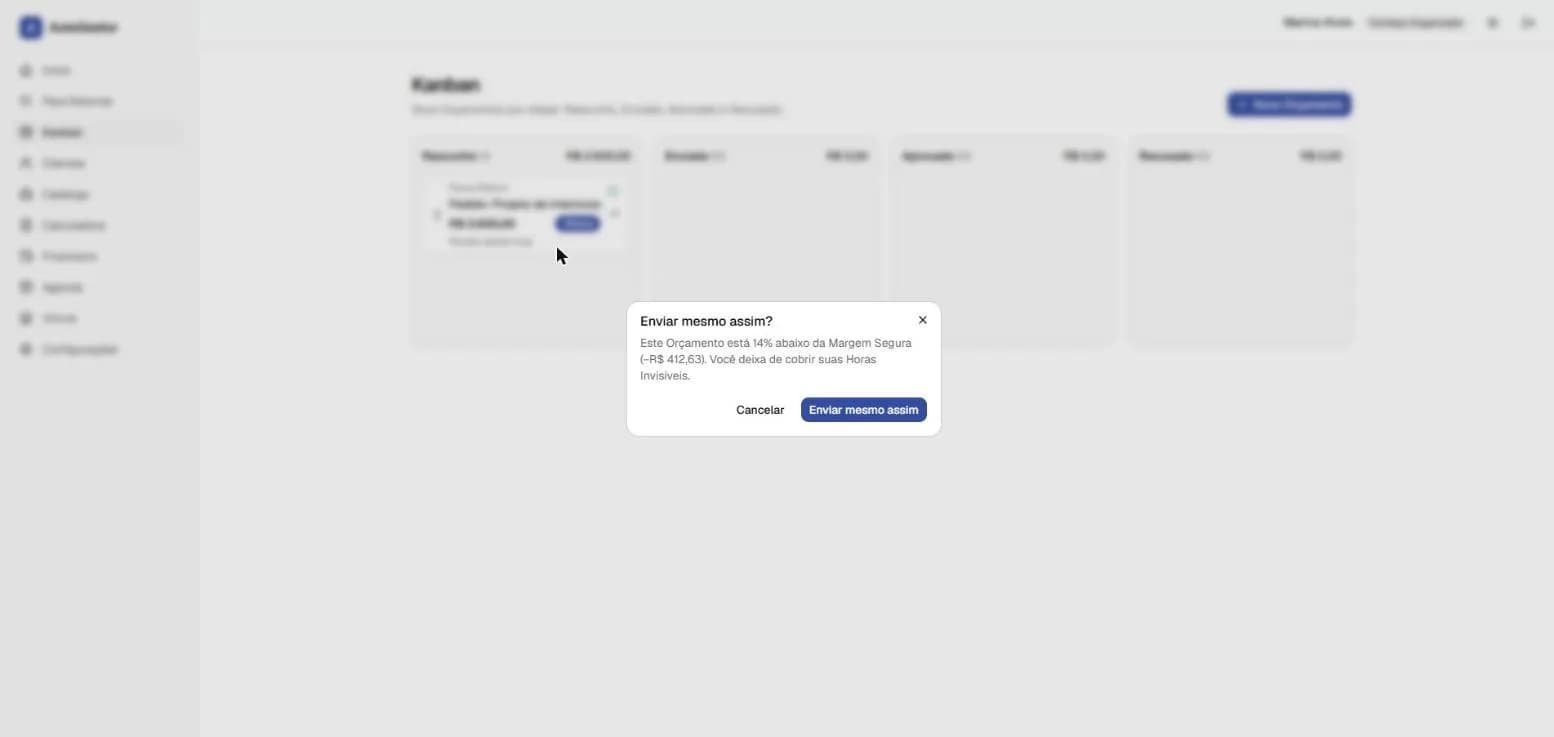
When she discounts it to R$ 2,600, it shows up instantly: “14% below the Safe Margin”. And when she moves the card to Sent, the system asks whether she wants to send it anyway, showing the R$ 412.63 that no longer covers her invisible hours. The decision is still hers — the product just makes sure it's a conscious one.
To reach the client, a button opens WhatsApp with the quote message already written, through a wa.me link. There's no paid Meta integration: zero cost per message and no risk of the professional's number being blocked.
/** Desvio de Margem: fração (−0,15 = 15% abaixo do Preço Recomendado). */
export function desvioDeMargem(entrada: {
  precoProposto: number;
  precoRecomendado: number;
}): Resultado<number> {
  if (!(entrada.precoRecomendado > 0)) return falha("PRECO_RECOMENDADO_ZERADO");
  return {
    ok: true,
    valor: (entrada.precoProposto - entrada.precoRecomendado) / entrada.precoRecomendado,
  };
}
5. Approved, received, in the till
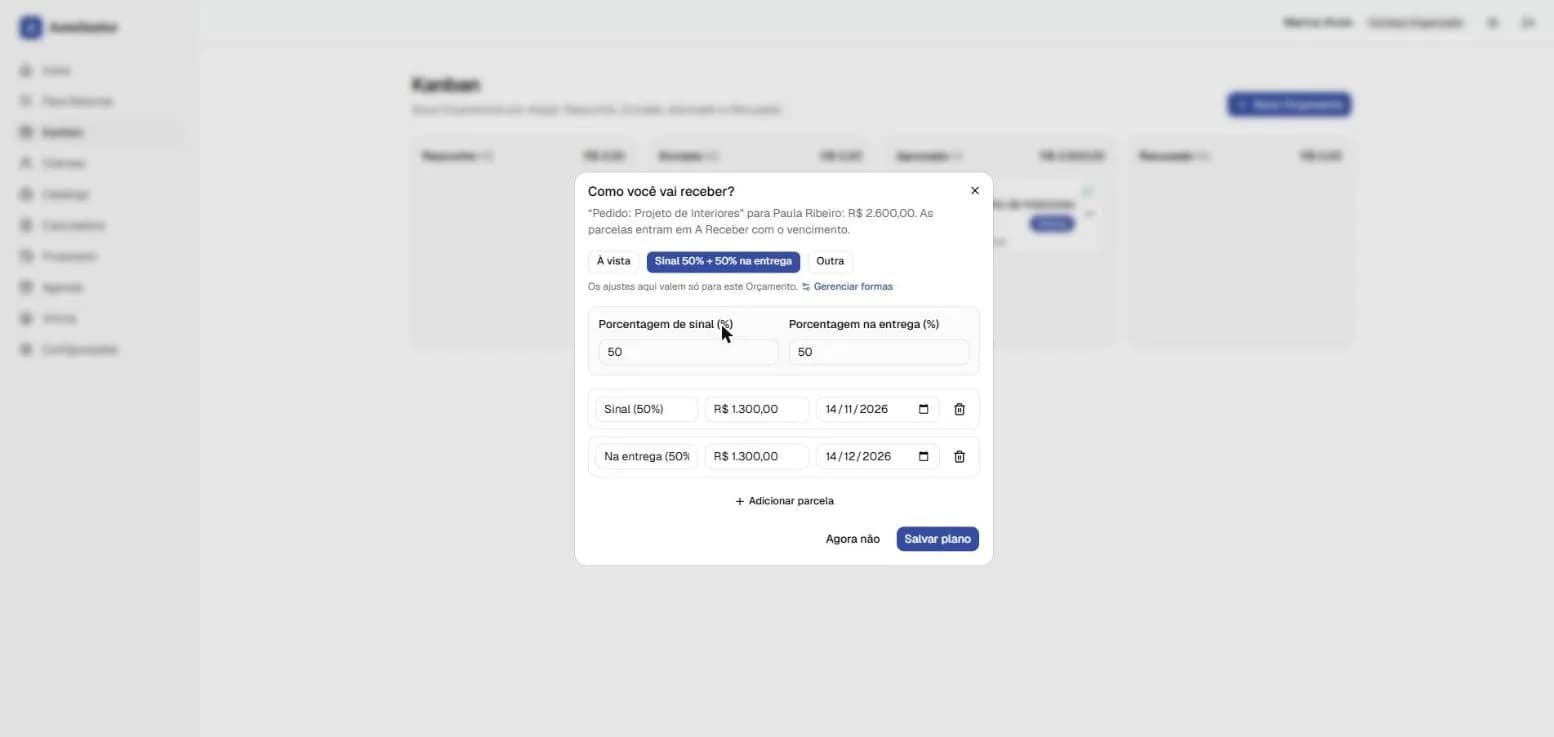
When the client approves, the system asks how she'll be paid: in full, a 50% deposit with the rest on delivery, or another split. Installments go into Receivables with due dates. Approval is reversible — the quote can be reopened as long as no payment has been recorded yet.
Finance follows cash-basis accounting, and that was a deliberate decision. Monthly profit counts money that came in, not approved quotes. A number that doesn't match the bank statement destroys the trust of someone who already doesn't know if they made a profit; approved-but-unpaid shows separately, as Receivables.
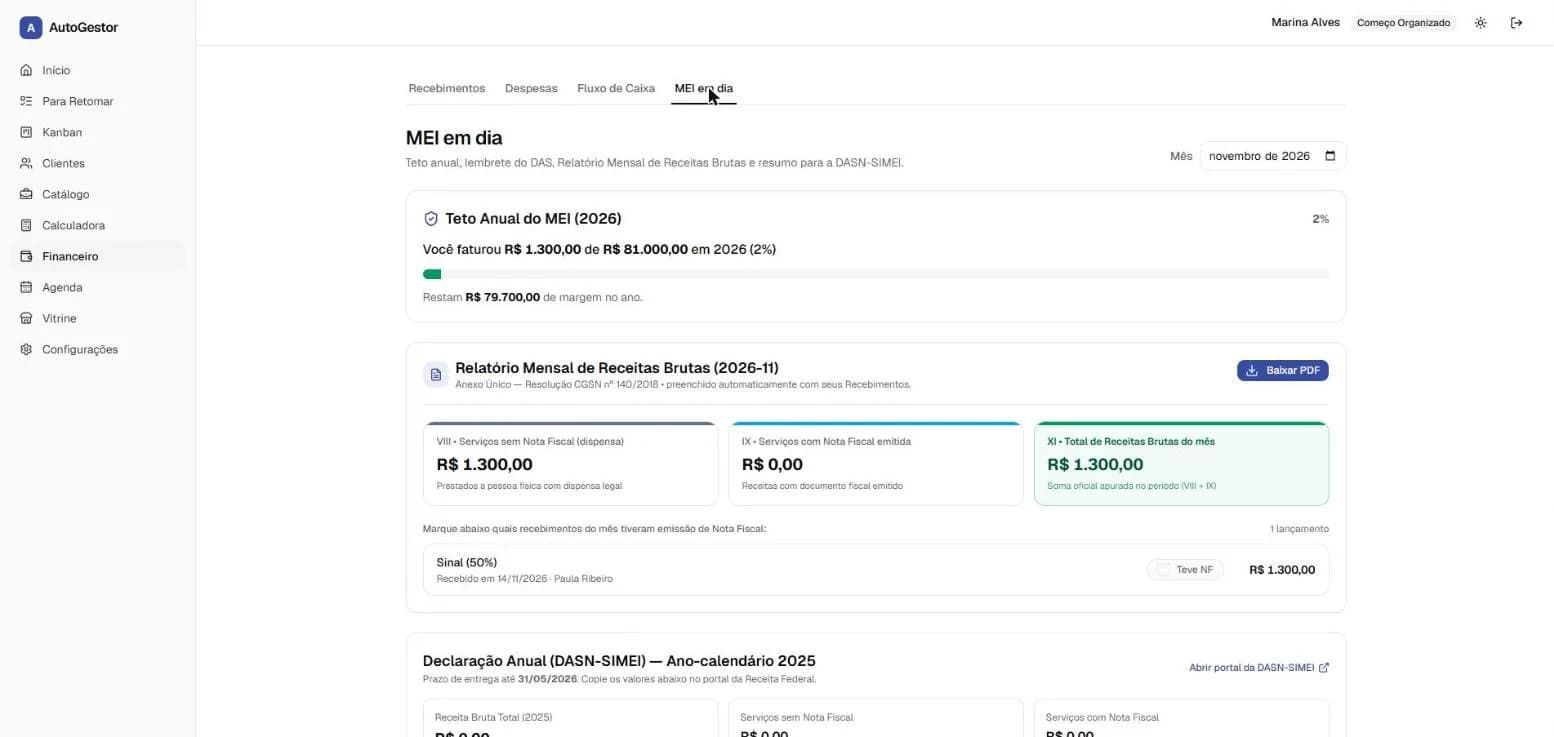
The “MEI up to date” tab tracks the annual revenue cap and builds the monthly gross-revenue report the MEI must keep, from her own payments. The cap lives in a dated table with its legal source; since the new 2027 value was still awaiting presidential sign-off, a test starts failing if that value takes effect without confirmation from the official source.
- Plans with limits enforced by the backend: the free tier gets up to 10 quotes a month and 3 services on the storefront; the backend returns 402 and the front end just reflects it.
- A lead above the limit is never lost: it's held back and hidden by a restrictive RLS policy, and shows up on upgrade or at the start of the next month.
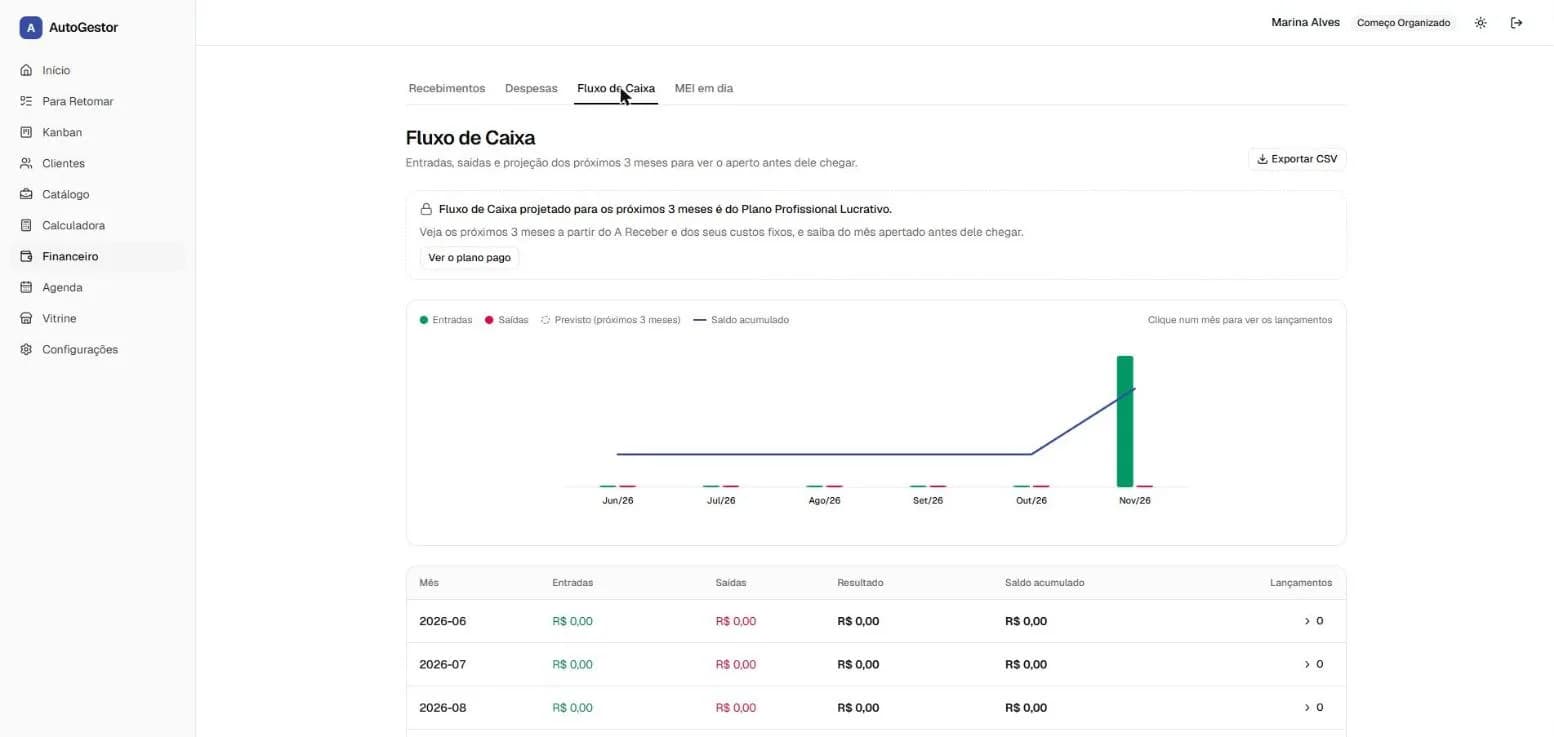
- The three-month cash-flow projection is a paid feature — the free tier sees the history.
6. The client and the month at a glance
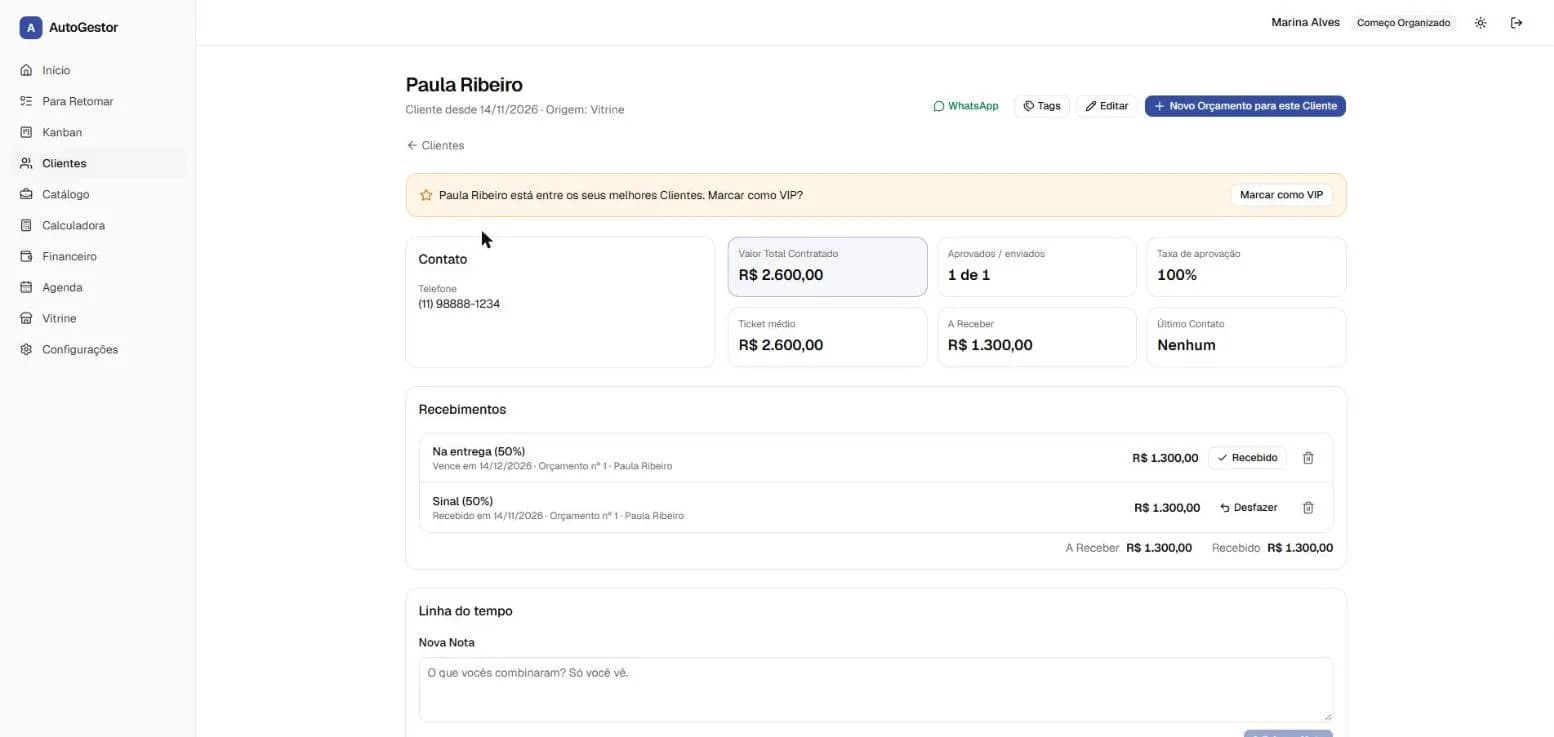
Each client gets a record with quote history, payments, approval rate and a notes timeline — and the system suggests marking top clients as VIP. The phone number shown there is stored encrypted in the database.
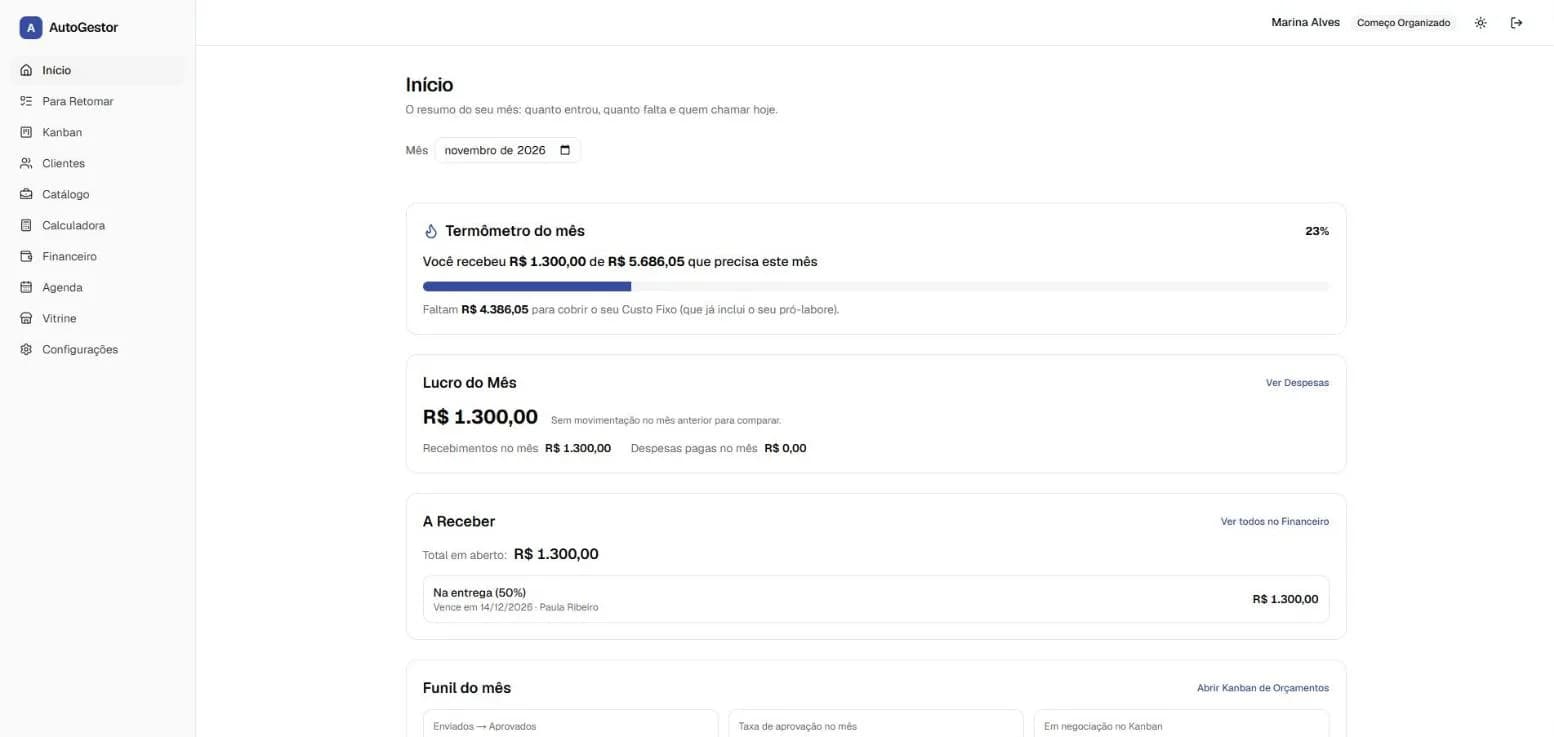
The Home screen answers three daily questions: how much came in, how much is still missing to cover the month's fixed cost and who needs a follow-up today. The “month thermometer” uses the same fixed cost as the calculator, so the target is the professional's real life, not a generic number.
7. One person's data, only for that person
Every professional lives in the same PostgreSQL database, so isolation can't depend on someone remembering to filter a query. Every table has forced Row Level Security — not even the table owner bypasses it — and the backend only touches data inside a transaction that tells the database who is logged in. Without that context, queries come back empty: the system fails closed.
Database roles are split by job: one for migrations, one for the app, one just for login and one just for the storefront's public reads, none allowed to bypass RLS. A test breaks CI if a new table shows up without a policy. Another professional's record returns 404, not 403, so it doesn't even confirm it exists.
Clients' personal data — tax ID, phone, email, address — is encrypted in the application with AES-256-GCM, with the key ID stored alongside to allow rotation. To find a client by phone without decrypting anything, a column next to it stores an HMAC of the normalized value (a blind index). If only the database leaks, no tax ID or phone number is exposed.
- Passwords hashed with argon2id; login and sessions via Better Auth, in a schema only the auth role can see.
- Data protection in practice: terms and privacy, exporting your own data and deleting your account, free tier included.
- Logs and errors (Sentry) free of personal data, a health check that tests the database and encrypted backups with a restore runbook.
ALTER TABLE "clientes" ENABLE ROW LEVEL SECURITY;
-- FORCE: nem o dono da tabela escapa da política.
ALTER TABLE "clientes" FORCE ROW LEVEL SECURITY;

-- USING vale para ler, alterar e excluir; WITH CHECK impede
-- gravar (ou mover) uma linha para outro Profissional.
CREATE POLICY "isolamento" ON "clientes"
  USING ("profissional_id" = app_profissional_id())
  WITH CHECK ("profissional_id" = app_profissional_id());
Behind the screens
It's a pnpm monorepo with three packages: the Next.js 16 front end with Tailwind and shadcn-style components; the Fastify API, the only thing that touches the database; and a shared package holding only pure business rules — pricing, plans, the MEI cap, WhatsApp messages —, used by both sides and covered by hundreds of tests.
The infrastructure was designed for a low price point: everything runs in Docker on a fixed-cost VPS, orchestrated by Dokploy, with the storefront served from Cloudflare's cache. The app also works as a PWA, for people who work on the go from their phones. Work was organized in small issues and pull requests, and architecture-changing decisions became ADRs.
What's next
Three fronts are on the roadmap. An MCP (Model Context Protocol) server, so AI assistants can query and operate AutoGestor on the professional's behalf — logging an expense, checking what's still to be received — under the same access rules as the app. A WhatsApp chatbot, so people who live on their phones can handle the day without opening the dashboard. And integrated payments with split, so clients can pay the deposit straight from the storefront and the card moves on the Kanban by itself.
The same rule that has guided the product so far applies to all three: AI comes in where it helps with conversation, never where the maths has to be exact — and every new piece has to fit the cost of a low-priced subscription.